¶ UI Table Component
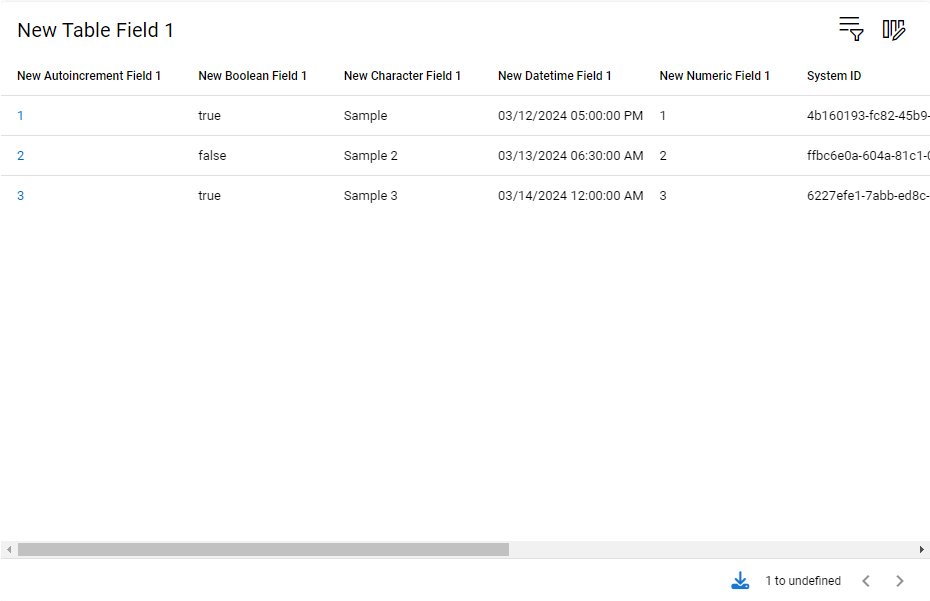
The UI Table provides the following capabilities:
- Developer defined queries built in form designer for each specific view they are on
- Developer defined columns built in form designer for each specific view they are on
- User customizable appended queries for each user*
- User customizable columns for each user*
- Full script support in client events
*Coming soon!
¶ Form Designer
¶ Adding a UI Table to a form
Drag a new table component from the Form Designer Toolbox and drop on the form layout.
¶ UI Table Properties
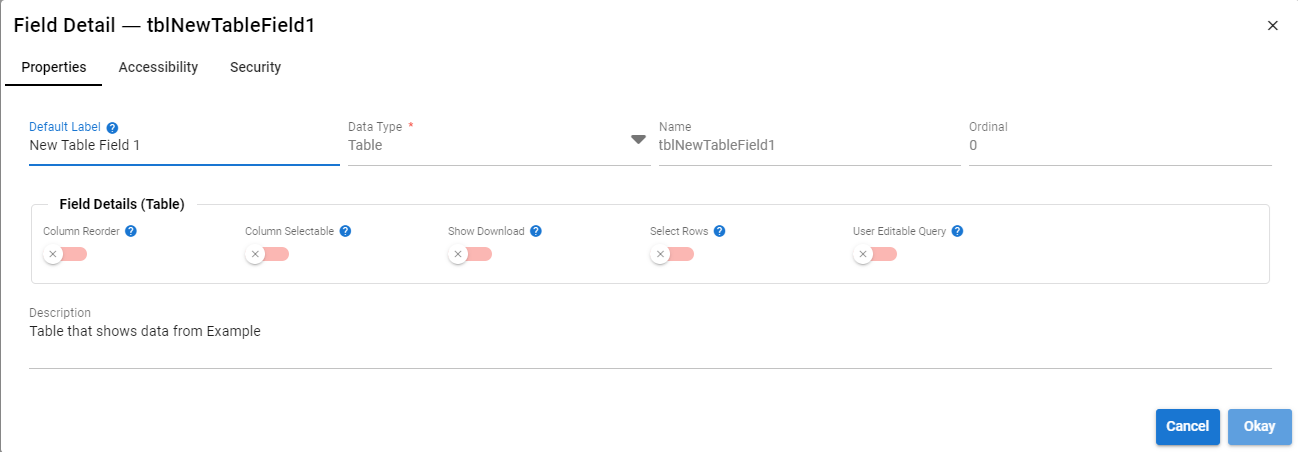
- Card Mode
Renders table as a grid with cards. This is default behavior on the mobile client, this property forces card mode on desktop browsers. - Column Reorder
Allow users to specify their own column order for the UI Table. The change applies only to their own sessions. - Column Selectable
Allow users to change the columns displayed in the table. The change applies only to their own sessions. - Show Download
Shows the export button at the bottom of the table allowing data in the table to be downloaded. - Select Rows
Shows the row checkboxes allowing script and table event processing of individual selected recods. - User Editable Query
Allows the user to change the query on the table. The change applies only to their own sessions.
¶ Component Details (UI Table)
¶ UI Table Security
¶ UI Table History
¶ Scripting UI Tables
UI Table fields are only accessible in Client Events Advanced Script Actions. They are accessed by using the $current object dotted to the name of the UI Table.
Below is a list of methods that can be used on a UI Table.
¶ addRecord(record: Record<string, any>): boolean
This method is used to add a new display record/row to the UI Table.
Parameters:
| Name | Datatype | Required | Description |
|---|---|---|---|
| record | object | Yes | POJO representing the data row to add |
Returns: Numeric value representing the number of records/rows in the UI Table.
    // In this example we have a table on the UI Layout with a name of 'tblAuditAssets'
    const rNewRecord = {

    [BaseFields.ID]: $ps.uid()

  };

  $current.tblAuditAssets.addRecord(rNewRecord);
¶ count() : number
This method is used to determine the number of records currently displayed in the UI Table.
Returns: Numeric value representing the number of records/rows in the UI Table.
¶ getDirty(): Record<string, any>[]
Returns records in the Ui Table that have are dirty due to use of addRecord or updateRecord
Returns: Array of records that are detected as dirty.
¶ getRecord(id: UUID): Record | undefined
Returns a record row from the table based on it's UUID
Parameters:
Returns: The Record from the UI Table data that matches the requested id.
¶ getRecordByQuery(query: Record<string, any>) : Record | undefined
Returns the 1st record row from the table matching the query criteria.
Parameters:
| Name | Datatype | Required | Description |
|---|---|---|---|
| query | object | Yes | A POJO object representing the query to match to |
Returns: The first mayching Record from the UI Table data.
¶ getSelected(): UUID<string>[]
Returns array of UUIDs representing the currently selected rows in the UI Table.
¶ getUnselected(): UUID<string>[]
Returns array of UUIDs representing the rows in the UI table that are not selected.
Returns: Array of records that are detected as dirty.
¶ getRecord(id: UUID): Record | undefined
Returns a record row from the table based on it's UUID
Parameters:
Returns: The Record from the UI Table data that matches the requested id.
¶ refresh(): void
Triggers a refresh of the UI Table once the current Client Event cycle is complete.
¶ query(query: Record<string, any>) : Record[] | undefined
Query the UI Table data for records matching the query object. Returns an array of matching records.
Parameters:
| Name | Datatype | Required | Description |
|---|---|---|---|
| query | object | Yes | A POJO object representing the query to match to |
Returns: Record[] of matching records from the UI Table data.
¶ setEncodedQuery(encodedQuery: string, executeQuery: boolean): boolean
Update the UI table's query and optionally run the query.
Parameters:
| Name | Datatype | Required | Description |
|---|---|---|---|
| encodedQuery | string | Yes | Encoded query to set |
| executeQuery | boolean | No | Execute the encoded query for the UI table |
Returns: Boolean true if the query was successful.
¶ selectAll(): void
Places select markers on all the rows in a UI table.
¶ unselectAll(): void
Removes all selection markers on rows in a UI table.
¶ updateRecord(record: Record<string, any>) : boolean
Update an existing record row in the UI Table.
¶ columnAggregates(columnName: string): any
Returns an object with all aggregate method results.
Parameters:
| Name | Datatype | Required | Description |
|---|---|---|---|
| columnName | string | Yes | Name of the UI Table Column |
Returns: A TableAggregateResult object enumerating the result of all aggregate functions.
¶ columnAverage(columnName: string) : number
Returns the Average of numeric values for a column.
Parameters:
| Name | Datatype | Required | Description |
|---|---|---|---|
| columnName | string | Yes | Name of the UI Table Column |
Returns: Number
¶ columnCount(columnName: string): number
Returns a Count of the number of record rows containing a value for a column.
Parameters:
| Name | Datatype | Required | Description |
|---|---|---|---|
| columnName | string | Yes | Name of the UI Table Column |
Returns: Number
¶ columnMax(columnName: string) : number
Returns the Maximum numeric value for a column.
Parameters:
| Name | Datatype | Required | Description |
|---|---|---|---|
| columnName | string | Yes | Name of the UI Table Column |
Returns: Number
¶ columnMean(columnName: string) : number
Returns the Mean (Average) of numeric values for a column.
Parameters:
| Name | Datatype | Required | Description |
|---|---|---|---|
| columnName | string | Yes | Name of the UI Table Column |
Returns: Number
¶ columnMedian(columnName: string) : number
Returns the Median numeric value for a column.
Parameters:
| Name | Datatype | Required | Description |
|---|---|---|---|
| columnName | string | Yes | Name of the UI Table Column |
Returns: Number
¶ columnMode(columnName: string) : number
Returns the most common number (Mode) that appears in the numeric values for a column.
Parameters:
| Name | Datatype | Required | Description |
|---|---|---|---|
| columnName | string | Yes | Name of the UI Table Column |
Returns: Number
¶ columnMin(columnName: string) : number
Returns the Minimum numeric value for a column.
Parameters:
| Name | Datatype | Required | Description |
|---|---|---|---|
| columnName | string | Yes | Name of the UI Table Column |
Returns: Number
¶ colSum: (columnName: string)
Returns the Sum of numeric values for a column.
Parameters:
| Name | Datatype | Required | Description |
|---|---|---|---|
| columnName | string | Yes | Name of the UI Table Column |
Returns: Number