¶ Configurations
Standalone Training Guide
Version: 20260605
This guide explains how AssetTrack Configuration records work, who can change them, and what the current configuration settings control. It is intended for users with the AssetTrack Manager role.
¶ Contents
- Configuration Overview
- Navigating to AssetTrack Configuration
- Configuration Record Fields
- Data Types
- Changing Configuration Values Safely
- Current Configuration Catalog
- Audit Rules and Audit Dashboard Settings
- Lifecycle Event Approval Settings
- Manager Dashboard Health Thresholds
- Notification Settings
- Common Configuration Scenarios
- Quick Reference: Safe Configuration Rules
¶ Configuration Overview
AssetTrack Configuration records control platform behavior for audits, lifecycle approvals, manager dashboard thresholds, and notifications. These settings are intended to be maintained by users with the AssetTrack Manager role.
Most configuration records are Boolean true/false settings, which means they simply turn a piece of functionality on or off. Other settings use numeric thresholds, durations, text values, JSON, dates, or table queries depending on what the setting controls.
Important: Configuration records should not be deleted. Existing configuration names should not be changed. The supported change is to update the Value field for the existing configuration record.
¶ Navigating to AssetTrack Configuration
Open AssetTrack Configuration from AssetTrack Data in the left navigator. The list shows the available configuration records with columns such as Name, Datatype, Description, System Create Date, System Created By, and update information.
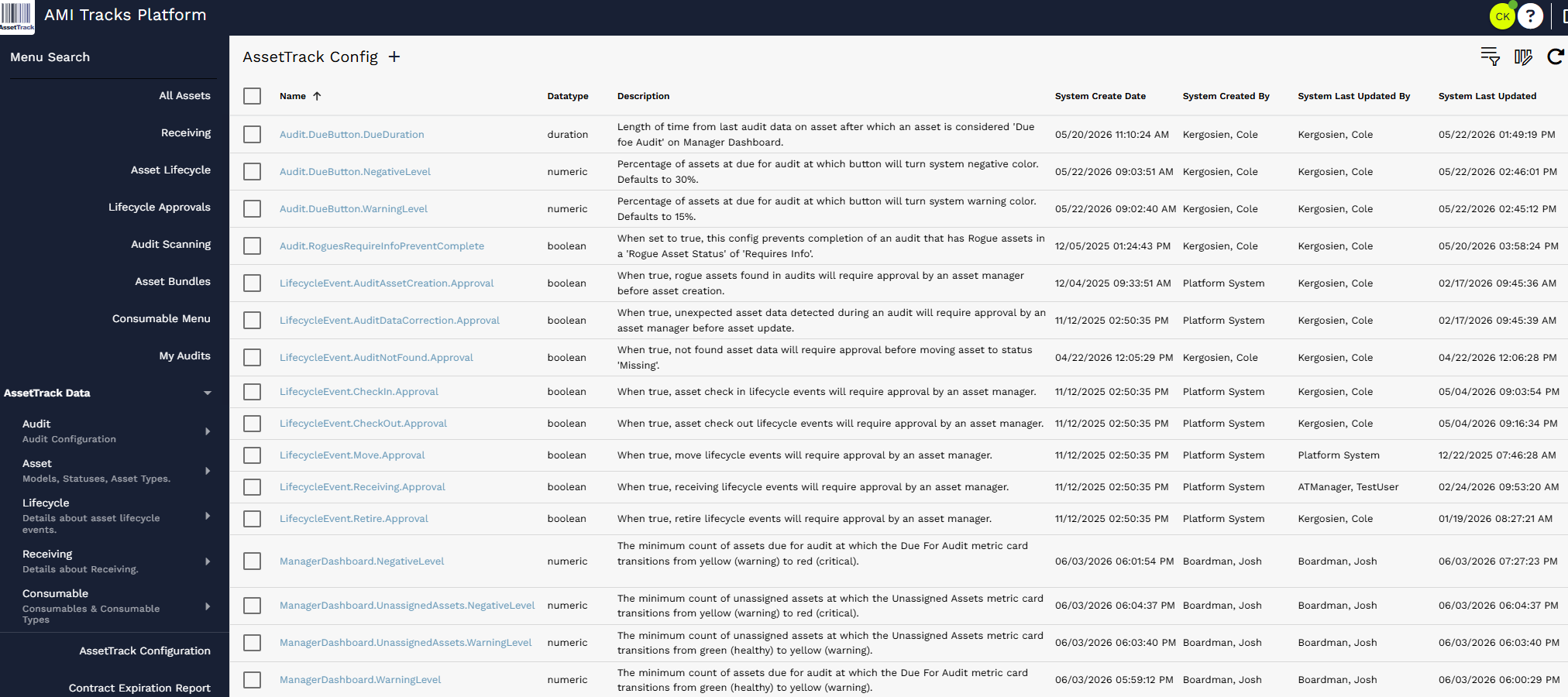
AssetTrack Configuration list showing existing configuration settings.
¶ Configuration Record Fields
Each configuration record includes the following key fields:
| Field | Description |
|---|---|
| Name | The system identifier for the configuration. Do not rename existing configuration records. |
| DataType | The expected value type, such as boolean, numeric, duration, JSON, DateTime, character, or table query. |
| Description | A plain-language explanation of what the configuration controls. |
| Value | The editable setting value. The specific value field shown depends on the DataType. |
¶ Data Types
The DataType field controls the kind of value that should be entered. Use the current DataType as the source of truth for which value field should be edited.
| Data Type | Meaning | Example Use |
|---|---|---|
| Boolean | True or false. The most common configuration type. | Turn lifecycle approval or notifications on/off. |
| Character | Text value. | Store a short text value when a setting requires text. |
| DateTime | Date and time value. | Store a date/time-based setting. |
| Duration | Length of time, stored as a duration value. | Set how long after audit data an asset is considered due for audit. |
| JSON | Structured JSON value. | Store advanced structured configuration data. |
| Numeric | Number value. | Set dashboard thresholds or percentages. |
| TableQuery | Saved query/filter logic. | Control query-based behavior when a setting expects a query. |
¶ Changing Configuration Values Safely
- Navigate to AssetTrack Data > AssetTrack Configuration.
- Find the configuration record by name or description. Use list filtering or sorting when needed.
- Open the configuration record and review the Description and DataType.
- Update only the appropriate Value field for that DataType.
- Save the configuration record.
- Test the related workflow, such as lifecycle approvals, audit completion, dashboard thresholds, or notifications.
Safe Editing Rules: Do not delete configuration records. Do not rename configuration records. Do not change a DataType unless directed by AMI/AssetTrack support. Update the Value only, then test the affected workflow.
¶ Current Configuration Catalog
The following catalog is based on the current configuration export provided for this guide. Values may differ by customer instance or after future configuration changes.
¶ Audit Rules and Audit Dashboard Settings
These settings control audit behavior and the audit due metric used in dashboards.
| Configuration | Data Type | Default Value | Purpose / Notes |
|---|---|---|---|
| Audit.DueButton.DueDuration | duration | 180 days (15,552,000,000 ms) | Length of time from last audit data on asset after which an asset is considered Due for Audit on the Manager Dashboard. |
| Audit.DueButton.NegativeLevel | numeric | 30 | Percentage of assets due for audit at which the button will turn the system negative color. Defaults to 30%. |
| Audit.DueButton.WarningLevel | numeric | 15 | Percentage of assets due for audit at which the button will turn the system warning color. Defaults to 15%. |
| Audit.RoguesRequireInfoPreventComplete | boolean | True | When set to true, this prevents completion of an audit that has Rogue assets in a Rogue Asset Status of Requires Info. |
¶ Lifecycle Event Approval Settings
These Boolean settings determine whether lifecycle events are automatically processed or first routed to the Lifecycle Approvals list for AssetTrack Manager review.
| Configuration | Data Type | Default Value | Purpose / Notes |
|---|---|---|---|
| LifecycleEvent.AuditAssetCreation.Approval | boolean | True | When true, rogue assets found in audits will require approval by an asset manager before asset creation. |
| LifecycleEvent.AuditDataCorrection.Approval | boolean | True | When true, unexpected asset data detected during an audit will require approval by an asset manager before asset update. |
| LifecycleEvent.AuditNotFound.Approval | boolean | False | When true, not found asset data will require approval before moving the asset to status Missing. |
| LifecycleEvent.CheckIn.Approval | boolean | False | When true, asset check in lifecycle events will require approval by an asset manager. |
| LifecycleEvent.CheckOut.Approval | boolean | False | When true, asset check out lifecycle events will require approval by an asset manager. |
| LifecycleEvent.Move.Approval | boolean | False | When true, move lifecycle events will require approval by an asset manager. |
| LifecycleEvent.Receiving.Approval | boolean | False | When true, receiving lifecycle events will require approval by an asset manager. |
| LifecycleEvent.Retire.Approval | boolean | False | When true, retire lifecycle events will require approval by an asset manager. |
¶ Manager Dashboard Health Thresholds
These numeric thresholds control when Manager Dashboard health metric cards move between healthy, warning, and critical states.
| Configuration | Data Type | Default Value | Purpose / Notes |
|---|---|---|---|
| ManagerDashboard.NegativeLevel | numeric | 50 | The minimum count of assets due for audit at which the Due For Audit metric card transitions from yellow (warning) to red (critical). |
| ManagerDashboard.UnassignedAssets.NegativeLevel | numeric | 500 | The minimum count of unassigned assets at which the Unassigned Assets metric card transitions from yellow (warning) to red (critical). |
| ManagerDashboard.UnassignedAssets.WarningLevel | numeric | 200 | The minimum count of unassigned assets at which the Unassigned Assets metric card transitions from green (healthy) to yellow (warning). |
| ManagerDashboard.WarningLevel | numeric | 20 | The minimum count of assets due for audit at which the Due For Audit metric card transitions from green (healthy) to yellow (warning). |
¶ Notification Settings
These Boolean settings determine whether notifications are sent for common asset and audit actions. Notifications may also depend on user/group email data and related AssetTrack settings.
| Configuration | Data Type | Default Value | Purpose / Notes |
|---|---|---|---|
| Notification.AssetCheckIn | boolean | False | Send a notification to the assigned person and supported by group when an asset is checked into stock. |
| Notification.AssetCheckOut | boolean | False | Send a notification to the assigned person and supported by group when an asset is checked out to a person. |
| Notification.AssetMove | boolean | False | Send a notification to the assigned person and supported by group when an asset is moved to a different location. |
| Notification.AssetReceived | boolean | False | Send a notification to the assigned person and supported by group when an asset is received. |
| Notification.AssetRetire | boolean | False | Send a notification to the assigned person and supported by group when an asset is retired. |
| Notification.AuditComplete | boolean | False | Send a notification to the assigned groups and people when an audit is completed. |
| Notification.AuditStart | boolean | False | Send a notification to the assigned groups and people when an audit is started. |
¶ Common Configuration Scenarios
Require manager approval for a lifecycle action: Open the matching LifecycleEvent.*.Approval setting and set its Boolean value to True. Related lifecycle events will route to the Lifecycle Approvals workflow before asset data is applied.
Allow lifecycle action to process without approval: Open the matching LifecycleEvent.*.Approval setting and set its Boolean value to False. Events of that type can process without manager approval.
Prevent audits from closing while rogue asset info is missing: Set Audit.RoguesRequireInfoPreventComplete to True. Users will need to provide required rogue asset information before completing an audit.
Change Manager Dashboard warning/critical thresholds: Update the ManagerDashboard.* numeric threshold records. These values control when dashboard metric cards change from healthy to warning or warning to critical colors.
Turn notifications on or off: Open the matching Notification.* Boolean setting and set it to True or False. Notifications may still require valid email values on related people or groups.
¶ Quick Reference: Safe Configuration Rules
- Only AssetTrack Managers should change AssetTrack Configuration records.
- Change values intentionally and document the reason for the change when possible.
- Do not delete configuration records.
- Do not rename existing configuration records.
- Do not change DataType unless instructed by AMI/AssetTrack support.
- After making a change, test the affected workflow before relying on it in production.