¶ Approvals

Standalone Training Guide
Version: 20260605
This guide explains how AssetTrack Managers review and process lifecycle event approvals. It covers the Lifecycle Approvals list, batch approval and rejection, reviewing a single lifecycle event, and the configuration that determines which lifecycle events require approval.
¶ Contents
- Approval Overview
- Lifecycle Approvals List
- Approving or Rejecting Events in Bulk
- Reviewing a Single Lifecycle Event
- Event Field Changes and Manager Review
- Accept, Reject, and Reprocess Actions
- Approval Configuration
- Quick Reference
Role and configuration: Approvals are performed by users with the AssetTrack Manager role. The exact events that require approval are configurable in AssetTrack Configuration.
¶ Approval Overview
Approvals provide a manager review step before selected lifecycle events are finalized. They give AssetTrack Managers a chance to review proposed asset changes, confirm that the event is correct, reject bad data, or reprocess an event after adjustments are made.
Lifecycle events can come from normal lifecycle workflows, audit-driven corrections, rogue asset creation, not-found audit results, and other system actions. When a lifecycle event is configured to require approval, it is placed in a Pending Approval status and appears in the Lifecycle Approvals interface.
Manager review: Approving a lifecycle event allows the proposed changes to proceed. Rejecting a lifecycle event prevents that event from being applied. Managers should review field changes carefully before accepting events that alter asset data.
| Approval concept | Meaning |
|---|---|
| Pending Approval | The lifecycle event is waiting for manager review. |
| Accept / Approve | Allows the lifecycle event to proceed and apply its proposed changes. |
| Reject | Rejects the event so the proposed changes are not applied. |
| Reprocess | Attempts to process the lifecycle event again after review or correction. |
¶ Lifecycle Approvals List
Navigate to AssetTrack > Lifecycle Approvals in the left navigator. The page opens a display form labeled Lifecycle Event Approval. The main list on the page is called Pending Lifecycle Events.
Every event shown in this list is in a status of Pending Approval. The list includes key fields such as Event Type, Asset, System Created By, System Create Date, Event Status, To Status, To Location, and To Assignee. The normal list tools can be used here, including filtering, sorting, column selection, refresh, and row selection.
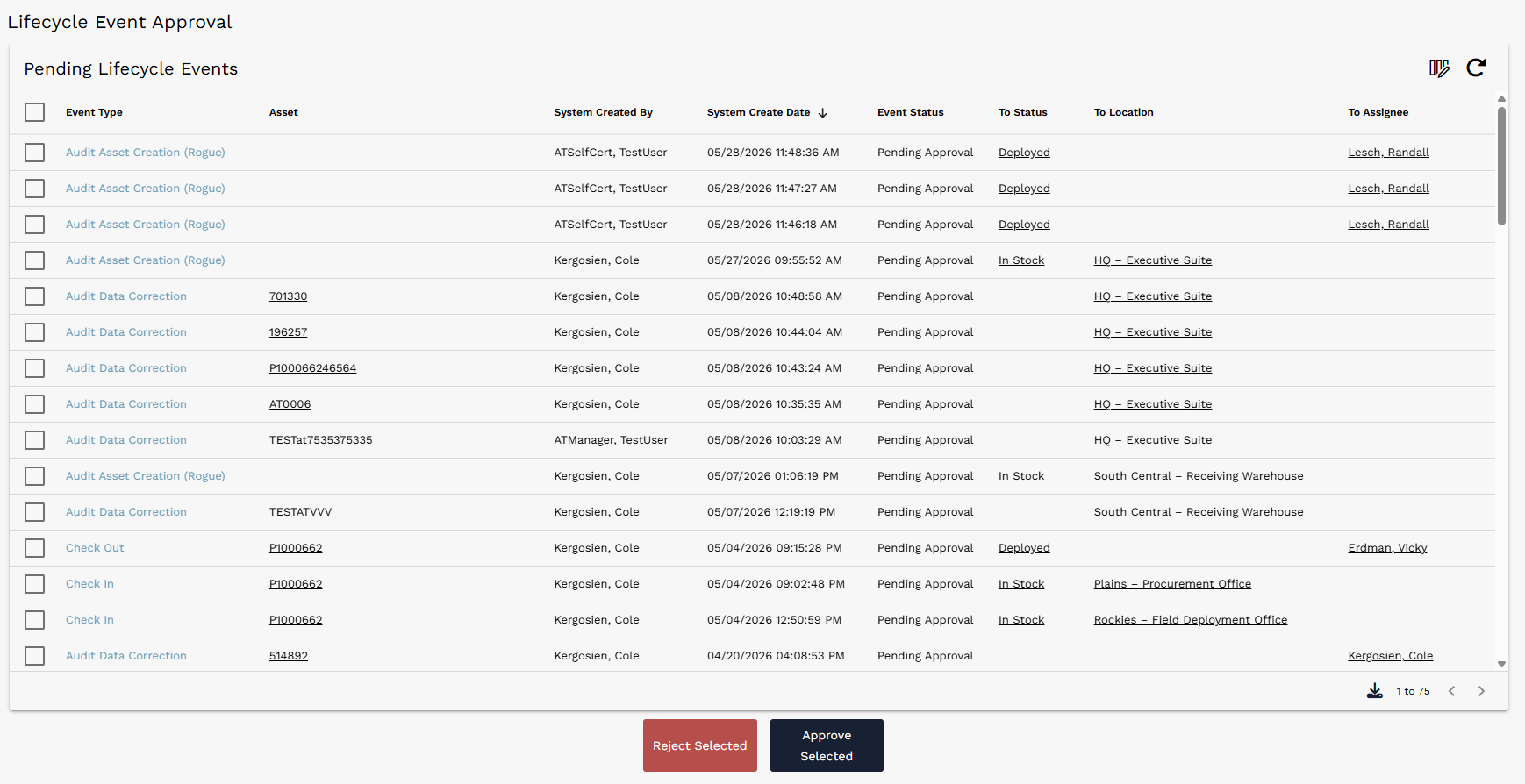
Lifecycle Event Approval page showing Pending Lifecycle Events and batch approval controls.
Tip: Use the list controls to narrow the Pending Lifecycle Events list before selecting events for approval or rejection.
¶ Approving or Rejecting Events in Bulk
To process multiple approvals at once, first filter or sort the Pending Lifecycle Events list to find the events that need review. Select one or more events using the check boxes on the left side of the list.
After events are selected, use Approve Selected or Reject Selected below the list. AssetTrack will process the selected events and display a confirmation message when the action is complete.
| Step | Action |
|---|---|
| 1 | Filter or sort the Pending Lifecycle Events list. |
| 2 | Select one or more events using the check boxes on the left side of the list. |
| 3 | Choose Approve Selected or Reject Selected. |
| 4 | Review the confirmation message to verify the approvals or rejections were processed. |

Confirmation message shown after selected lifecycle events are approved.
Bulk review: Bulk actions are best used when the selected events are similar and do not require individual review. For events with unusual data changes, open and review the lifecycle event directly.
¶ Reviewing a Single Lifecycle Event
Managers can also open a single lifecycle event from the Pending Lifecycle Events list and approve or reject just that event. Select the lifecycle event row or event type link to open the detailed lifecycle event form.
The lifecycle event form shows key identifying information such as Event Type, Event Status, Event Text, Asset, Asset Tag, and Serial Number. These fields help the manager understand what kind of event is being reviewed and which asset will be affected.
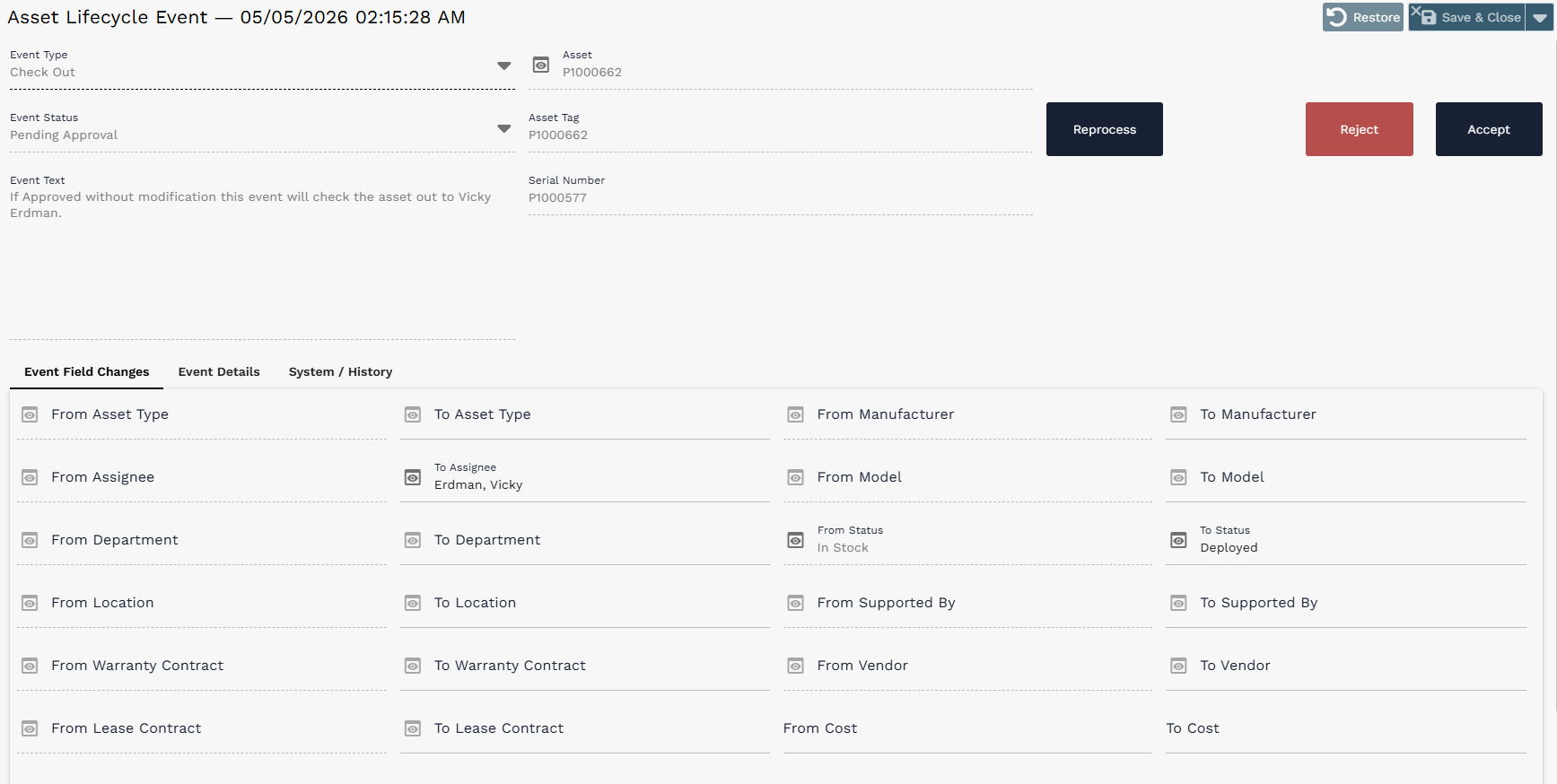
Lifecycle Event record showing event details, proposed field changes, and Accept, Reject, and Reprocess actions.
¶ Event Field Changes and Manager Review
The Event Field Changes tab is the most important area to review before accepting a lifecycle event. It shows the data changes that will be applied to the asset if the event is accepted.
Common review fields include From Status and To Status, From Location and To Location, and From Assignee and To Assignee. These fields let the manager compare the asset state before and after the proposed event.
| Field area | What to review |
|---|---|
| From Status / To Status | Shows whether the asset status will change, such as In Stock to Deployed. |
| From Location / To Location | Shows whether the asset location will change, such as one stockroom to another. |
| From Assignee / To Assignee | Shows whether the asset assignment will change, such as checking an asset out to a person. |
| Event Text | Provides a plain-language explanation of what the event will do if approved. |
Review guidance: If the event data does not look correct, managers can reject the event or update/reprocess as appropriate before changes are finalized.
¶ Accept, Reject, and Reprocess Actions
After reviewing the event details and field changes, use the action buttons on the lifecycle event form to complete the review.
| Action | Result |
|---|---|
| Accept | Approves the event and allows the proposed changes to apply. |
| Reject | Rejects the event and prevents the proposed changes from being applied. |
| Reprocess | Runs the lifecycle event processing logic again. This can be useful after correcting or validating event data. |
Before accepting: Only accept an event after confirming that the proposed field changes are correct. Approved events may update asset fields or allow audit-driven asset changes to proceed.
¶ Approval Configuration
Which lifecycle events are routed to Pending Approval is configurable through settings on the AssetTrack Configuration list. These settings are managed by AssetTrack Managers.
For example, audit-driven events such as rogue asset creation, unexpected asset data correction, or not-found changes may be configured to require manager approval before changes are applied to the affected assets. This gives managers a chance to catch bad audit data before it updates asset records.
Configuration planning: Approval configuration should be reviewed with the organization's operational process in mind. High-impact or audit-driven changes are often good candidates for approval requirements.
¶ Quick Reference
| Item | Detail |
|---|---|
| Where to go | AssetTrack > Lifecycle Approvals |
| Who reviews approvals | AssetTrack Managers |
| Main list | Pending Lifecycle Events |
| Batch process | Select events, then use Approve Selected or Reject Selected. |
| Single-event process | Open one lifecycle event, review details, then use Accept, Reject, or Reprocess. |
| What to review | Event type, event text, asset details, and Event Field Changes. |
| Configuration location | AssetTrack Configuration list |
¶ Common approval workflow
- Navigate to Lifecycle Approvals.
- Use list tools to find the lifecycle events that need review.
- For simple batches, select events and approve or reject them from the list.
- For more detailed review, open a single lifecycle event and inspect the Event Field Changes tab.
- Use Accept, Reject, or Reprocess based on the review outcome.